
What Is Gym Management Software? 2026 Guide
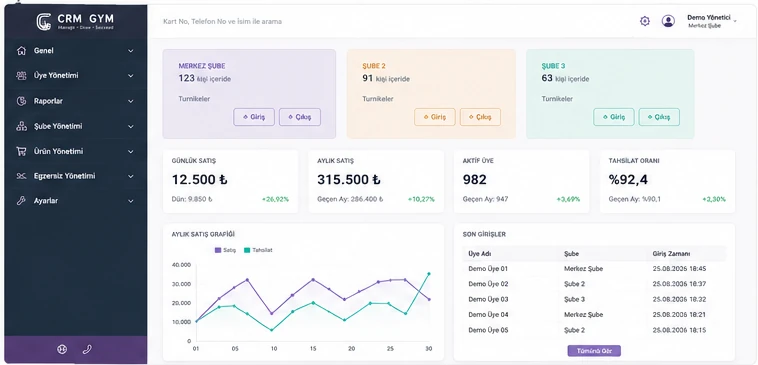
Gym management software is a digital operations system that runs membership packages, billing, check-in and access, class bookings, personal training (PT) workflows and reporting from one panel. In 2026, growing clubs need that unified layer more than scattered spreadsheets or door-only tools.
This guide explains what gym software is, what it is for, which features actually matter, and how to evaluate options — in an informational frame. The goal is clarity before purchase, not hype. Toward the end we briefly connect to CRM Gym’s club management capabilities.
Throughout the guide we explain gym management software in plain business language — which processes it unifies, how it differs from spreadsheets or single-purpose tools, and ten practical selection criteria. That keeps informational intent clear without keyword-cannibalizing commercial pages.
What Is Gym Management Software?
In short: gym management software digitizes day-to-day club operations. Creating member profiles, tracking package dates, recording payments, validating active memberships at the door, managing class capacity and reviewing weekly performance all live in one system.
It helps to contrast it with tools often confused with it. Spreadsheets or paper get a small club started quickly, but struggle to reliably connect billing, access and bookings at once. General accounting software handles invoices and books, not freezes, class quotas or turnstile rules. Door-only software can open a gate; it does not run renewals, balances or PT calendars. Gym software is the spine that connects those layers. In other words, fitness club software is not one feature — it completes the workflow from membership to reporting.
What Does Gym Management Software Do?
The core benefit is centralizing operations. Front desk, finance and studio staff share the same live record, so “which file is right?” fades. Member tracking and membership dates become visible: who is active, frozen, or nearing expiry. Billing clarifies cash flow; access control enforces membership at the door; bookings manage capacity and no-shows; reporting moves decisions closer to data than gut feel. A gym operations program designs these as linked processes, not isolated screens.
In practice, gym automation speeds recurring work — from renewal reminders to class fill rates, PT sessions to branch comparisons. The point is not removing people; it is giving the team more time with members and service quality. Well-designed gym software makes those recurring tasks visible and manageable.
Which Features Should Gym Software Include?
Feature lists can grow long; the real question is what each capability earns the business. The sections below are backbone areas for most clubs. Under each heading we cover not only what you can do, but what it earns you.
Member and membership management
Profiles, package types, start/end dates, freezes, renewals and status are the daily backbone. Benefit: the desk sees the right membership state in seconds; missed renewals and conflicting packages drop. This is the modern form of member tracking software.
Payments and collection tracking
Sales records, balances and collection history make cash flow visible. Benefit: “who paid, who is late?” is answered without email threads; finance and floor staff share one picture.
Turnstile and access control
A turnstile system tied to active membership reduces unauthorized entry and makes visit volume measurable. Benefit: security and membership status are managed together; manual checks drop. Turnstile and access solutions
QR code entry
QR entry shortens queues in peak hours and speeds the member experience. Benefit: less desk load; check-ins stay digital. Explore QR entry solutions for detailed scenarios. QR entry solutions
Class and reservation management
Capacity, waitlists and cancel rules protect studio order. Benefit: fewer overbooks and empty sessions; members see clear expectations. See the reservation system page for flow examples. Reservation system
Personal training management
Trainer assignment, session tracking and PT performance are a distinct revenue line. Benefit: sessions are not lost; PT revenue and fill become visible. PT and reporting flows make this concrete. PT and reporting
Reporting
Indicators like member growth, collections, visits and class fill improve decision quality. Benefit: “why did we drop this month?” rests on measurement, not guesswork. A fitness management system only improves what it can measure.
Multi-location management
Branch filters, a central overview and shared membership policies are critical for chains. Benefit: compare locations in one login instead of separate spreadsheets; standards stay consistent.
Who Is Gym Management Software For?
Fitness clubs and sports centers are the classic fit; membership volume and door traffic show value quickly. Pilates / Reformer studios lean on bookings and capacity. PT studios need session and trainer calendars. Multi-site or chain clubs need central reporting and per-branch control. Smaller clubs can also set structure early once processes start to tangle, so growth stays manageable. The common thread is keeping membership tracking and the operations spine together instead of scattered tools.
Is Spreadsheet Member Tracking Enough?
Tracking members in a spreadsheet can work in the first months with a very small roster. It is fast, low-cost and familiar. The issue is not that spreadsheets are “bad”; as the club grows, the same data splits across files, expiries get missed, collections drift, access and bookings stay disconnected, and permissions plus reporting become hard.
Membership tracking software or a gym CRM offers a single source of truth and process links at those breakpoints. You do not need to ban spreadsheets; exports and temporary lists can still use them. For the live operations spine, software is the more sustainable base. Tying collections to access via the same membership status is especially hard to enforce by hand in spreadsheets. This comparison can be deepened in a later cluster article.
What to Check When Choosing Gym Software
Before you buy, use these ten points as an objective checklist. Focus on business needs rather than brand promises; test each item against your club scenario during a demo:
- Ease of use: Can desk and trainers learn it quickly?
- Membership management: Are packages, freezes, renewals and status flows complete?
- Billing: Are debts, balances and collection history clear?
- Turnstile / QR: Does it fit your current or planned access scenario?
- Bookings: Can you manage capacity, cancels and waitlists?
- Reporting: Can you filter and share the metrics you need?
- Multi-site: Will you manage more than one location now or soon?
- Data practices: Are access permissions and backup approaches clear? (Judge processes, not unverified security claims.)
- Support: Are setup, migration and ongoing help reachable?
- Scalability: Can the system grow with more members and locations?
Advantages of Cloud-Based Gym Software
Cloud-based gym software enables access from different devices without being locked to one office PC, plus central data and a shared multi-site view. Maintenance and version updates usually sit with the provider, reducing local install burden. Teams across locations especially benefit from one source of record. Treat these as operational benefits; “cloud” alone is not an automatic security claim — still ask about permissions, backups and provider practices.
Managing a Gym with CRM Gym
This guide stayed informational; when you evaluate products, CRM Gym aims to unify member and membership management, billing, turnstiles, QR entry, bookings, PT, reporting and multi-site scenarios on one platform. Review CRM Gym’s gym management software features to see the scope from memberships to access control. The pillar page is commercial and conversion-focused; this article answers “what is it / how to choose” — together they complete both context and product framing.
gym management software · CRM Gym club management features
For a deeper commercial overview focused on setup and outcomes, continue to the club management features page — or request a demo to test live flows for your needs.
Frequently asked questions
Run your gym with CRM Gym
Explore membership tracking, billing, turnstiles, bookings and reporting on one platform.